REROLLTACTICS
PowerShellBridge
PowerShellBridge
Couldn't load pickup availability
PowerShellBridge
Faster development with ChatGPT and PowerShell
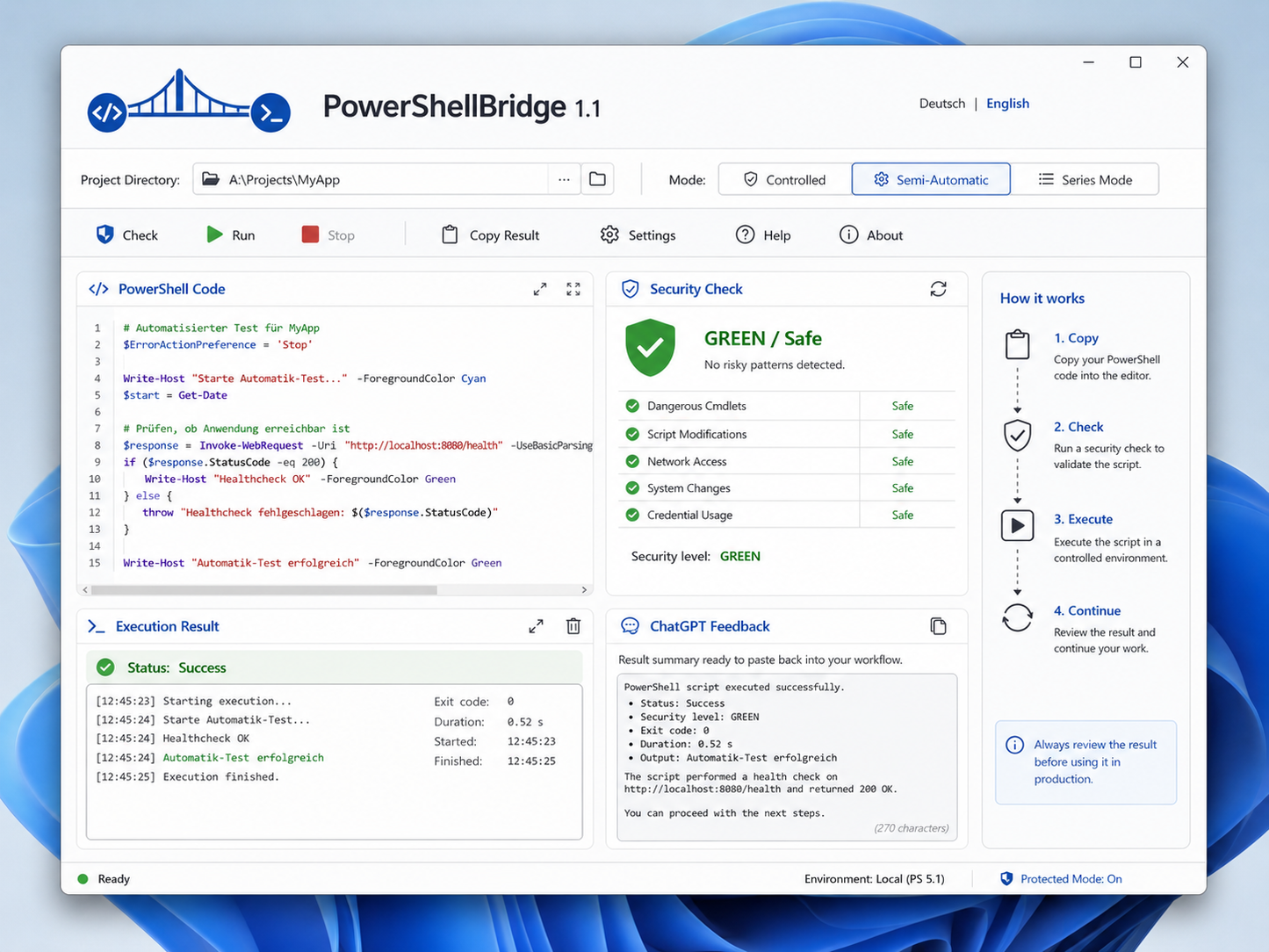
PowerShellBridge is a lightweight Windows application designed to make programming with ChatGPT faster, safer, and more convenient.
Instead of manually copying PowerShell code into the terminal, checking it yourself, running it, collecting the result, and then pasting the output back into ChatGPT, PowerShellBridge connects these steps into one simple workflow.
Copy a PowerShell code block from ChatGPT and PowerShellBridge takes over.
How PowerShellBridge works
The workflow is simple:
-
Copy a PowerShell code block from ChatGPT.
-
PowerShellBridge automatically detects the code from your clipboard.
-
The code is cleaned and checked for syntax errors.
-
A safety analysis classifies the code as Green, Yellow, or Red.
-
Safe code can be executed automatically.
-
The output, errors, exit code, and execution time are analyzed.
-
PowerShellBridge automatically creates a compact result for ChatGPT.
-
Paste the result back into ChatGPT and continue working.
This greatly reduces the repetitive manual work involved in AI-assisted programming.
Designed for AI-assisted development
PowerShellBridge is especially useful if you regularly use ChatGPT to build, modify, test, or repair Windows projects.
Typical workflow without PowerShellBridge:
ChatGPT generates code
→ copy code
→ open PowerShell
→ paste code
→ check working directory
→ run command
→ copy output
→ find relevant error messages
→ return to ChatGPT
→ paste result
With PowerShellBridge:
ChatGPT generates code
→ copy code
→ PowerShellBridge handles the rest
→ paste the generated result back into ChatGPT
The result is a much faster and cleaner development process.
Automatic clipboard detection
PowerShellBridge monitors the Windows clipboard locally.
When a PowerShell block is copied, the application can automatically recognize executable PowerShell code.
Normal text and previously processed code can be ignored.
This means you usually do not need to manually paste code into the application.
Simply copy the code from ChatGPT.
Automatic code cleanup
AI-generated code may occasionally contain formatting elements that should not be sent directly to PowerShell.
PowerShellBridge automatically cleans common issues such as:
-
Markdown code fences
-
formatting leftovers
-
problematic quotation marks
-
invisible characters
-
incorrect line endings
-
unnecessary whitespace
The cleaned version is used for execution.
PowerShell syntax checking
Before code is executed, PowerShellBridge checks the block for syntax problems.
Examples include:
-
missing brackets
-
incomplete
try/catchblocks -
unclosed quotation marks
-
invalid PowerShell structures
-
malformed commands
If a syntax error is detected, the code is not executed.
This helps prevent unnecessary failed runs and makes debugging easier.
Three-level safety system
Every detected PowerShell block is evaluated before execution.
Green – safe
Green commands can be executed automatically in automatic workflow modes.
Examples can include:
-
reading files
-
checking paths
-
running system checks
-
displaying information
-
harmless diagnostic commands
Yellow – confirmation required
Yellow commands may modify files, install packages, move data, or otherwise change the system or project.
PowerShellBridge pauses and asks for confirmation before execution.
Red – blocked
Potentially dangerous commands are blocked.
Examples can include destructive disk operations or dangerous system-level commands.
The goal is not to replace normal caution, but to create an additional safety layer when working quickly with AI-generated PowerShell code.
Three operating modes
PowerShellBridge offers different workflows depending on how much control you want.
Controlled mode
For maximum manual control.
Code is detected and displayed, but you manually decide when to check and execute it.
Ideal when testing unfamiliar scripts.
Semi-automatic mode
The recommended everyday mode.
PowerShellBridge automatically:
-
detects copied code
-
checks syntax
-
performs the safety analysis
-
executes Green code automatically
-
prepares the ChatGPT result
Yellow code still requires confirmation.
Red code remains blocked.
Series mode
Designed for longer development sessions with several consecutive code blocks.
After one successful execution, PowerShellBridge waits for the next copied code block and continues the workflow.
Yellow or Red commands interrupt the series for safety.
Controlled PowerShell execution
Code is executed in a separate controlled PowerShell process.
PowerShellBridge manages important execution parameters such as:
-
selected project directory
-
PowerShell process
-
execution timeout
-
standard output
-
error output
-
exit code
-
execution duration
-
cancellation
You can stop long-running commands directly from the application.
Intelligent result analysis
An exit code alone does not always tell you whether a script actually succeeded.
PowerShellBridge therefore also analyzes the output.
It can detect common indicators such as:
-
PowerShell errors
-
Python tracebacks
-
exceptions
-
parser errors
-
failed system checks
-
warning messages
-
successful test summaries
Results can be classified as:
-
Success
-
Success with warnings
-
Error
-
Unclear result
-
Cancelled
-
Timeout
Automatic ChatGPT feedback
After each execution, PowerShellBridge automatically creates a compact result that can be pasted directly back into ChatGPT.
For example:
PowerShellBridge Result

Status: SUCCESS
Working directory: A:\Projects\Example
Exit code: 0
Duration: 1.42 seconds
Security level: GREEN

Result:
The process completed successfully.

Relevant output:
OK: 15 | WARN: 0 | ERROR: 0
The result is automatically copied to the clipboard.
You only need to return to ChatGPT and press:
Ctrl + V
This allows ChatGPT to immediately analyze the real execution result and provide the next step.
German and English interface
PowerShellBridge supports both:
-
German
-
English
The interface language can be changed inside the application.
The selected language is saved for future sessions.
This makes the software suitable for both German-speaking and international users.
Local by design
PowerShellBridge works locally on your Windows computer.
The core application does not require:
-
a PowerShellBridge cloud account
-
a subscription
-
an external PowerShellBridge server
-
recurring API fees
Your project files remain on your computer.
PowerShellBridge itself does not require a paid API connection to ChatGPT.
You continue using ChatGPT normally in your browser or application.
No subscription
PowerShellBridge is sold as a one-time purchase.
You pay once and can continue using the purchased version permanently.
There is:
-
no monthly subscription
-
no annual subscription
-
no mandatory cloud plan
Updates within the purchased product version may be provided without requiring a subscription.
Future major versions may be offered separately.
Ideal for
PowerShellBridge is designed for:
-
developers using ChatGPT
-
hobby programmers
-
beginners learning programming with AI
-
Windows automation projects
-
Python projects controlled through PowerShell
-
local application development
-
debugging
-
project maintenance
-
repetitive development workflows
-
people who frequently copy PowerShell commands between ChatGPT and Windows
Especially useful for beginners
AI-assisted programming makes software development much more accessible, but working with terminals and long error messages can still be confusing.
PowerShellBridge simplifies this process by reducing the number of manual steps.
Instead of constantly switching between ChatGPT and PowerShell, users receive a structured workflow with:
-
automatic code detection
-
syntax checks
-
safety classification
-
controlled execution
-
readable results
This makes AI-assisted programming easier to follow without hiding what is actually happening.
Built for real development workflows
PowerShellBridge is not a code generator.
It is a bridge between the AI assistant and your local Windows development environment.
ChatGPT remains responsible for generating and analyzing code.
PowerShellBridge handles the local execution workflow.
This clear separation gives you the flexibility of ChatGPT while retaining local control over your computer and projects.
Key features
-
Automatic PowerShell code detection from the clipboard
-
PowerShell code cleanup
-
Syntax validation before execution
-
Green / Yellow / Red safety classification
-
Automatic execution of safe commands
-
Confirmation for potentially modifying commands
-
Blocking of dangerous commands
-
Controlled PowerShell execution
-
Configurable project directory
-
Execution timeout
-
Manual cancellation
-
Standard output and error capture
-
Exit-code analysis
-
Intelligent result evaluation
-
Automatic ChatGPT feedback
-
Automatic clipboard copy of results
-
Controlled mode
-
Semi-automatic mode
-
Series mode
-
German interface
-
English interface
-
Windows installer
-
Portable version
-
Local operation
-
No subscription
-
No mandatory cloud connection
Example workflow
You are developing a Python application with ChatGPT.
ChatGPT sends:
python tools\systemcheck.pyYou copy the block.
PowerShellBridge automatically:
-
detects the command,
-
checks the syntax,
-
classifies it as safe,
-
executes it,
-
captures the result,
-
analyzes the output,
-
creates a ChatGPT-ready response,
-
copies that response to your clipboard.
You paste the result into ChatGPT.
ChatGPT now knows exactly what happened on your computer and can provide the next step.
Why PowerShellBridge?
AI can write code very quickly.
The slow part is often everything around the code:
-
transferring commands
-
running them
-
checking errors
-
finding the important output
-
copying results back
PowerShellBridge reduces this friction.
It turns the repetitive loop between ChatGPT and PowerShell into a streamlined development workflow.
System requirements
PowerShellBridge is designed for Windows systems.
Recommended:
-
Windows 10 or Windows 11
-
64-bit system
-
Windows PowerShell 5.1 or compatible PowerShell environment
The installer contains the components required for the application itself.
A separate Python installation is not required for normal use of the packaged application.
Projects being developed may still require their own tools, runtimes, or dependencies.
Important notice
PowerShellBridge helps analyze and control PowerShell execution, but no automated safety system can guarantee that every possible script is harmless.
Users should review unfamiliar commands before allowing system or project modifications.
Yellow commands intentionally require confirmation for this reason.
PowerShellBridge is intended as a productivity and safety aid, not as a replacement for responsible system administration or backups.
One purchase. Permanent use.
PowerShellBridge is available as a one-time purchase.
No subscription. No recurring PowerShellBridge fees.
Install it, connect it to your development workflow, and use it whenever you work with ChatGPT and PowerShell.
Copy. Check. Execute. Continue.
PowerShellBridge turns AI-generated PowerShell code into a faster, safer development workflow.
Share